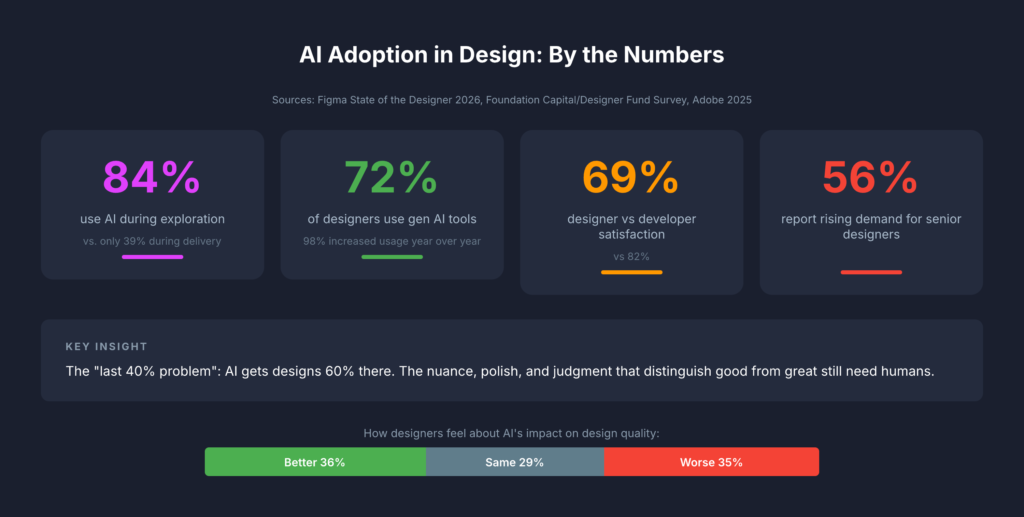
The most consequential change in how design teams use AI isn’t about generating mockups faster. It’s about thinking better. Across every major design publication and industry survey from 2024 to 2026, a clear consensus has emerged: AI’s greatest value to designers lies in ideation, critique, research synthesis, and strategic reasoning, not in producing visual assets. The data backs this up decisively. Foundation Capital’s 2025 survey of 400+ designers found that 84% use AI during exploration phases (research, ideation, strategy) versus just 39% during delivery. Figma’s own research shows only 33% of designers use AI to generate design assets, while 40% use it for data analysis and 38% for desk research. The tools haven’t caught up to the hype. Nielsen Norman Group’s May 2025 review found AI design tools still produce generic results with poor information hierarchy. But the thinking-partner use case is already delivering real returns. For design leads managing cross-functional teams in fintech and enterprise SaaS, this reframing isn’t academic. It changes how you staff projects, run critiques, synthesize research, and communicate with stakeholders.
From “enthusiastic intern” to outcome orchestrator
The design industry has converged on a spectrum of mental models for AI’s role, and understanding where your team sits on this spectrum matters more than which tools you’re using. Nielsen Norman Group, still the most cited authority in UX, has moved from their 2024 “AI as intern” metaphor to a far more ambitious 2026 framework called “outcome-oriented design.” In this model, designers stop crafting individual interfaces and instead define adaptive frameworks that respond to individual user goals. As Kate Moran and Sarah Gibbons wrote in March 2026, designers shift “from designing for the average to designing for the individual,” setting guardrails and constraints rather than pixel-level specifications.
John Maeda, now Microsoft’s CVP of Engineering for CoreAI Design & Research, frames this through his “UX → AX” (Agent Experience) paradigm: interfaces designed not just for humans but for AI agents that act on their behalf. His 2025 SXSW keynote outlined a taxonomy of collaboration spaces (chat, document, table, canvas) where human-AI partnership takes different forms. IDEO, meanwhile, has built an entire certificate program around “AI × Design Thinking,” with Managing Director Jenna Fizel positioning AI explicitly as a brainstorming partner.
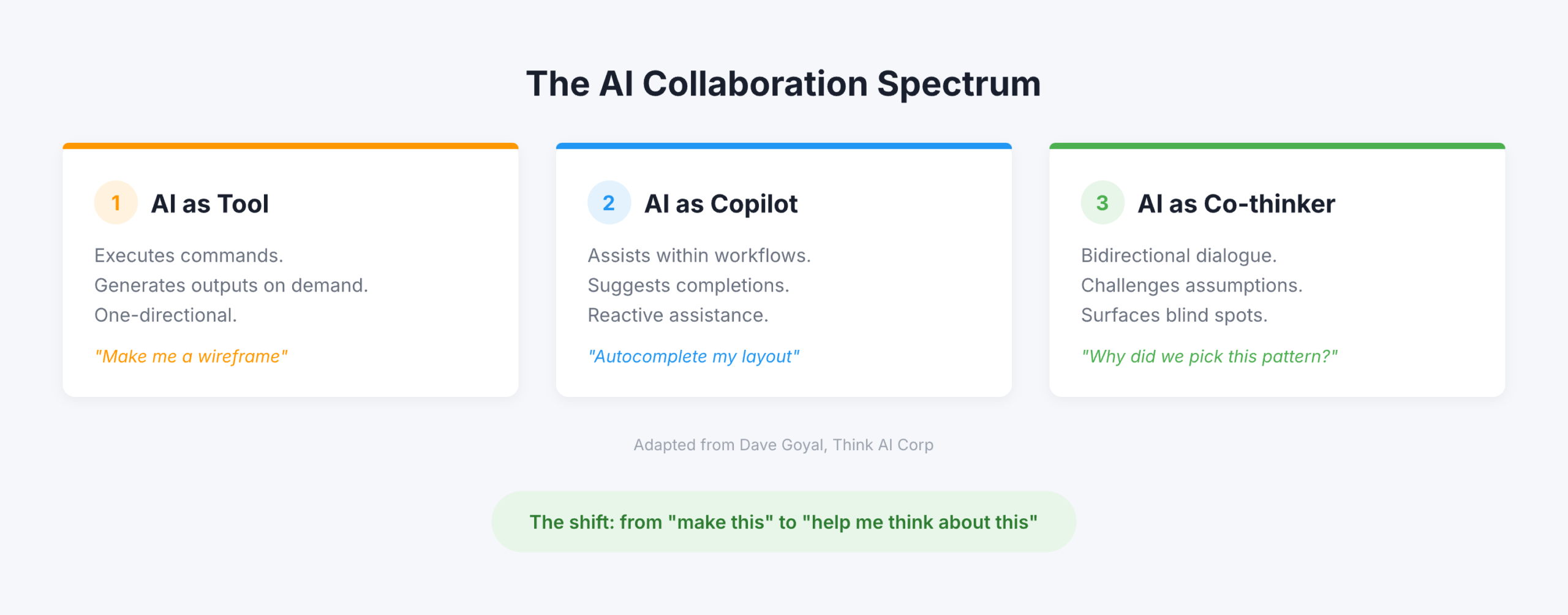
But the most useful framing for practitioners comes from Dave Goyal of Think AI Corp, who distinguishes between three levels. AI as “tool” executes commands and generates outputs. AI as “copilot” assists within workflows and suggests completions, what Goyal calls “a glorified autocomplete engine.” AI as “co-thinker” engages in bidirectional dialogue, challenges assumptions, and surfaces blind spots. The difference, Goyal argues, “is not in capability. It is in design intent.” Paul Boag of Smashing Magazine operationalized this most concretely: he creates Claude and ChatGPT projects loaded with client research, personas, survey results, and documentation, then uses the AI as “a co-worker who never gets tired and has a perfect memory.” Not to generate designs, but to challenge his thinking, review his work, and ask hard questions.
The data tells a more nuanced story than the hype
The adoption numbers are impressive on the surface but reveal important fault lines when you dig deeper. Figma’s State of the Designer 2026 (906 respondents across five regions) found that 72% of designers now use generative AI tools and 98% increased their usage over the past year. Adobe’s October 2025 survey of creative professionals reported that 99% use generative AI in some capacity, with 97% using it across multiple workflow stages. Yet these headline numbers mask a critical insight: designers are far less satisfied with AI than developers. Figma’s 2025 AI Report (2,500 users across seven countries) found developer satisfaction with AI tools at 82% versus just 69% for designers. Only 32% of all respondents said they could rely on AI output, and only 54% of designers said AI improves the quality of their work.
The Foundation Capital/Designer Fund survey adds crucial context. While 89% of designers report improved workflows, the adoption curve follows a clear pattern: heavy use in early-phase exploration, moderate use during creation, and minimal use in delivery. 96% of designers learned AI entirely through self-teaching, through side projects, peer tips, and social media. Formal training barely exists. Startups lead adoption, with early-stage designers more than twice as likely to fully integrate AI compared to enterprise teams. The “last 40% problem” persists: AI gets designs roughly 60% of the way there, but the nuance, polish, and judgment that distinguish good work from great work still require human hands.
The sentiment data is perhaps most telling. Figma’s 2026 survey found designers split almost perfectly into thirds on whether design has gotten better (36%), worse (35%), or stayed the same (29%) since AI’s rise. NNGroup declared 2026 “the year of AI fatigue.” Yet 82% of hiring managers said their company’s need for designers has increased or held steady, and 56% specifically report increasing demand for senior designers, those who bring the judgment and strategic thinking that AI cannot replicate.
Six ways design teams are using AI to think, not produce
The most compelling evidence for AI as thinking partner comes from practitioners documenting specific workflows. These fall into six categories that map directly to how agency design leads structure their work.
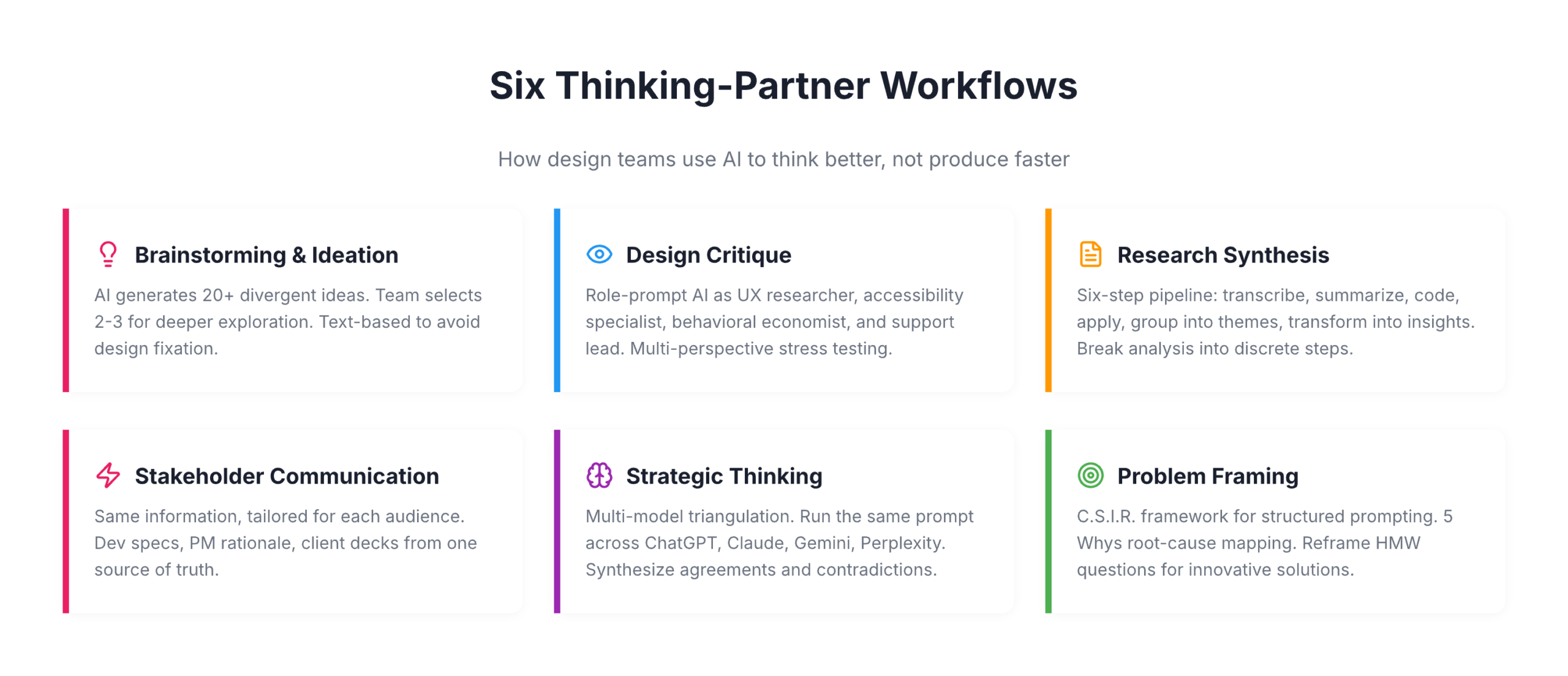
For brainstorming and ideation, Eleken, a SaaS design agency, has replaced traditional brainstorming’s awkward silence with a structured approach: AI generates 20+ possible solutions to a design problem, each team member selects 2-3 concepts that intrigue them, and those become starting points for deeper human exploration. IDEO U teaches a similar pattern: let AI generate divergent ideas, then use human creativity to “build on, combine, or completely flip these ideas on their head.” The key nuance, supported by a CHI 2024 study, is that AI image generators during ideation can actually increase design fixation and reduce originality. Text-based ideation with LLMs avoids this trap by keeping ideas abstract and malleable.
For design critique, Nicole Riemer of ROSE Digital published the most detailed framework. Her five-step process uses role prompting to stress-test features from multiple perspectives simultaneously: a UX researcher conducting a usability audit, an accessibility specialist evaluating WCAG compliance, a behavioral economist analyzing cognitive biases, and stakeholder perspectives including customer support leads asking “What could go wrong that would flood your queue?” The critical insight: never ask AI “Would you use this feature?” because it will always say yes. Instead, ask open-ended exploratory questions grounded in real persona data. Markiian Bobyliak of Supermega Design takes this further by connecting Claude Code directly to his project folder via MCP, giving AI access to Figma files, research documents, and stakeholder notes so it can review onboarding flows against actual user interviews and documented requirements.
For user research synthesis, the most rigorous approach comes from Great Question’s six-step pipeline: transcribe, summarize each segment, generate codes, apply codes to summaries, group into themes, and transform into actionable insights. The crucial principle is breaking complex analysis into discrete steps with clear inputs and outputs. UX researcher Dominika Mazur’s side-by-side comparison of human versus AI analysis found ChatGPT “reliable in coding and synthesizing” with a particular strength in processing speed, while human researchers excelled at “generating non-obvious insights.”
For stakeholder communication, Bobyliak’s workflow stands out: after finishing designs, he instructs Claude to create documentation tailored for different audiences from the same underlying information. Technical specs for developers, design rationale for future designers, business-goal alignment for product managers, and presentation content for clients that pulls real quotes from user interviews. Sandra Herz, an impact communication consultant, uses a similar approach, creating detailed stakeholder personas for critical decision-makers and then using AI to adapt pitches for each audience.
For strategic thinking, the emerging pattern is multi-model triangulation. Elizabeta Kuzevska of Revenue Experts AI runs the same competitive analysis prompt across ChatGPT, Claude, Gemini, and Perplexity simultaneously, keeps responses separate, then creates a synthesis prompt to identify agreements, contradictions, and unique insights. If you’re using one AI model for competitive intelligence, you’re building strategy on one model’s biased perspective.
For problem framing, the most structured approach is the C.S.I.R. framework (Context, Specific Info, Intent, Response Format) from AiforPro.net, which includes specific prompt patterns for root-cause mapping via the 5 Whys, reframing How Might We questions, and clustering problems by journey stage. Designer Erin Wilson demonstrated the power of reframing by comparing solutions generated from a conventional problem statement about climate change versus a reframed “How might we help people experience the impact of their carbon footprint?” The conventional framing produced conventional solutions while the reframed version generated innovative concepts like interactive VR simulators and personalized carbon impact stories.
Exercises that work on Monday morning
The gap between understanding AI-as-thinking-partner conceptually and using it effectively in practice is where most design teams stall. These five exercises, drawn from documented practitioner workflows, require no special setup beyond access to Claude or ChatGPT.
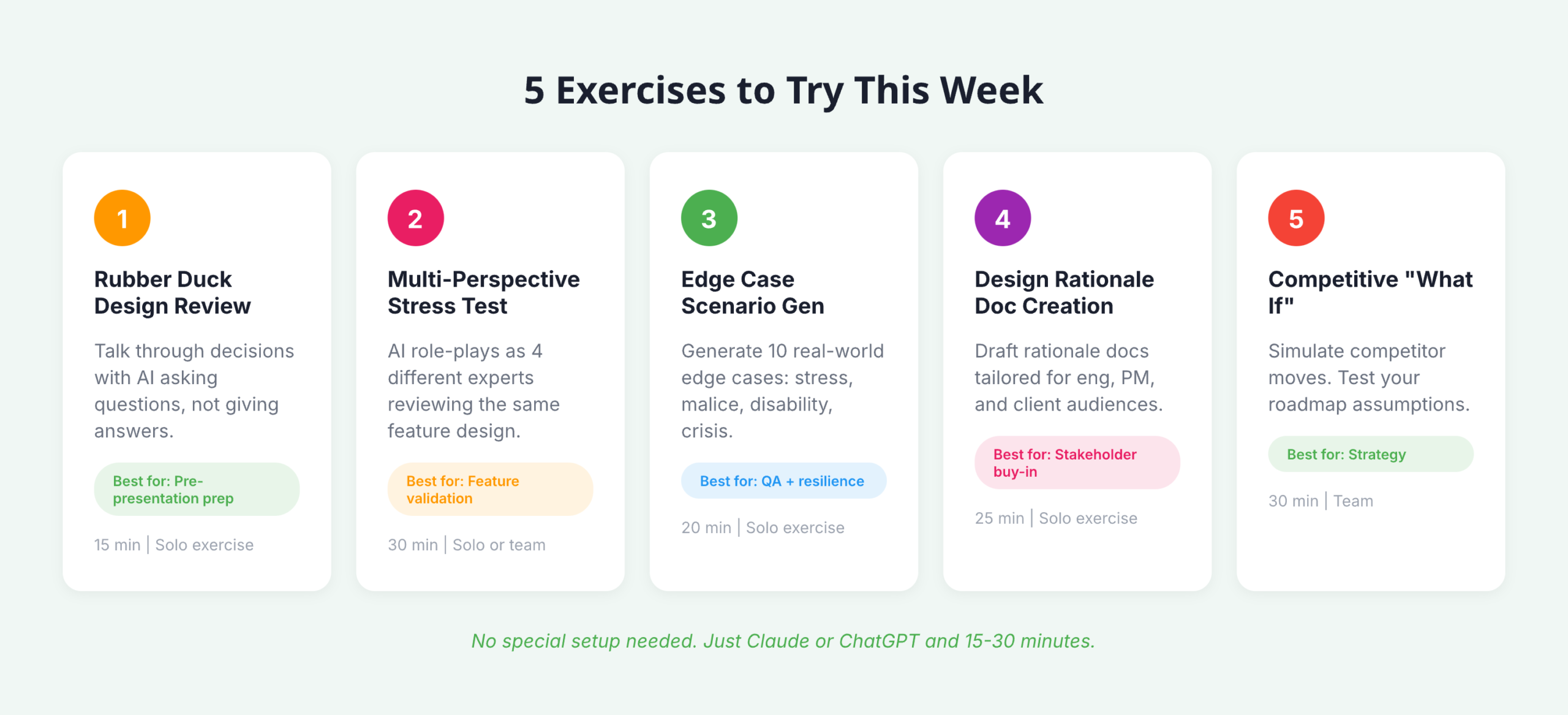
- Rubber duck design review: Prompt AI with “Act as my rubber duck. I’ll talk through my design decisions and I need you to help clarify my thinking by asking questions and reflecting back what I say, without giving direct answers.” Walk through your latest design decision. The forced articulation reveals gaps in reasoning and prepares you for stakeholder presentations.
- Multi-perspective stress test: Take your current feature design and run it through Nicole Riemer’s role-prompting framework. Feed the AI real persona data (not assumptions) and ask it to respond as a UX researcher, accessibility specialist, behavioral economist, and customer support lead, each evaluating the same feature from their perspective.
- Edge case scenario generation: Describe your feature’s happy path and prompt: “Generate 10 contextual edge cases where real human behavior deviates from this path. Consider users under stress, users with malicious intent, users with disabilities, and users in crisis situations.” This exercise directly addresses the blind spots that cause major UX incidents.
- Design rationale document creation: After making a key design decision, prompt AI with the decision context and ask it to draft a rationale document covering “why it matters,” a decision summary, supporting evidence, alternatives considered, and trade-offs accepted. Then create versions tailored for your engineering lead, your product manager, and your client.
- Competitive “what if” analysis: Feed AI your product’s current positioning alongside competitor data and ask: “What if our primary competitor launched [specific feature] tomorrow? How should our design strategy adapt? What assumptions in our current roadmap become invalid?”
Building a persistent “design copilot” amplifies all of these exercises. Avani of ADPList published a detailed guide recommending designers treat this like onboarding a new team member: write a “hiring brief” defining the AI’s personality and role, upload brand guidelines, design system documentation, accessibility standards, past research, and product strategy, then use the prompt “Please review what I’ve shared and ask me sequential questions to help complete your understanding of our brand, design system, product, and design culture.” Once onboarded, this persistent context transforms every subsequent interaction from a cold start into a conversation with a knowledgeable colleague.
What this means for design leadership in 2026
The most important finding across this research isn’t any single statistic or framework. It’s the emerging consensus that AI’s impact on design is primarily cognitive, not productive. The teams gaining the most advantage aren’t the ones generating assets faster; they’re the ones thinking more rigorously, considering more perspectives, and communicating design rationale more effectively. NNGroup’s insight crystallizes it: the skills that matter now are “curated taste, research-informed contextual understanding, critical thinking, and careful judgment,” precisely the skills that define senior design leadership.
For design leads at agencies working across fintech and enterprise SaaS, this has immediate structural implications. The “last 40% problem” means AI won’t replace your production designers anytime soon, but the exploration-heavy adoption pattern (84% in exploration versus 39% in delivery) suggests your biggest ROI comes from integrating AI into discovery, research synthesis, and strategic framing. These are the phases where agency teams often face the tightest time constraints and where client value is highest. The multi-audience communication capability alone, translating the same design rationale into developer specs, PM strategy docs, and client presentations, addresses one of the most persistent bottlenecks in cross-functional agency work.
The counter-narrative matters too. The Psychology Today research finding that “while generative AI enhances individual creativity, it simultaneously narrows collective diversity” is a genuine risk for teams that over-rely on AI for ideation without maintaining diverse human perspectives. And the CHI 2024 finding about AI-assisted ideation increasing design fixation suggests that how you integrate AI into brainstorming matters as much as whether you do. The practitioners getting the best results treat AI as a sparring partner that expands their thinking, not a shortcut that replaces it. That distinction, between amplification and automation, will define which design teams thrive and which find themselves, as NN Group warned, already replaceable.